 VoicePrivate
Buy Now
The short answer: a secure transcription service encrypts your recording on the way in, limits who can hear it, deletes it on a schedule you can check, and signs the agreements your work needs, such as an NDA or, for health records, a business associate agreement. It still has to receive your audio to transcribe it. If you want a copy that no vendor ever receives, VoicePrivate is the other route: dictation and transcription software that recognizes speech on your own Mac or Windows PC.
Key facts
- Rev charges $1.99 per audio minute for human transcription, delivered in 12 hours or less.
- TranscribeMe human transcription costs $0.79 per minute, usually completed in 1 business day.
- Speechnotes charges $0.10 per minute and deletes recordings from its servers after transcription.
- VoicePrivate General Edition costs $9.99 a month or $84 a year, with no audio upload.
- Prices above were checked on each vendor's own pricing page on November 3, 2026.
What a secure transcription service is, and where VoicePrivate differs
A secure transcription service is a transcription vendor, human or AI, that puts controls around your recording: encryption, access limits, retention rules and signed agreements. Every one of those controls governs a copy of your audio that now sits on the vendor's side. VoicePrivate is not a service. It is software, so the recording is turned into text on the computer that captured it, and there is no vendor copy to control.
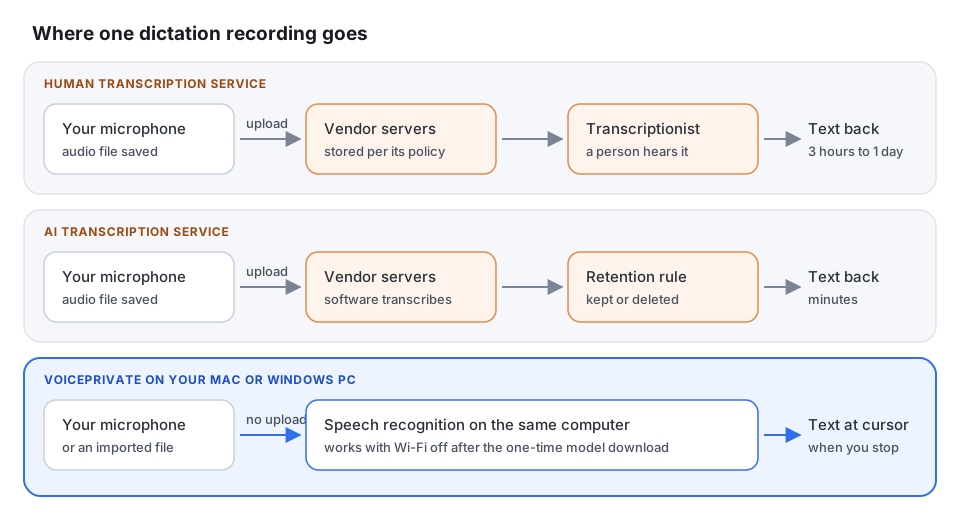
That leaves three kinds of product people mean when they search for a secure transcription service:
- Human transcription services such as Rev, TranscribeMe and SpeakWrite. You upload the file, it lands on their servers, and a transcriptionist listens to it.
- AI transcription services such as Speechnotes. You upload the file and software on their servers transcribes it, faster and cheaper, with no person listening.
- On-device transcription software such as VoicePrivate. Nothing is uploaded for transcription, because the speech recognition runs on your own Mac or Windows PC.
How to choose a secure transcription service: 9 questions to ask
Put these nine questions to any secure transcription service in writing before you upload a client, patient or research recording. The right column shows how VoicePrivate answers the same question, since you should hold software to the same standard.
| Question | What a good service answer looks like | VoicePrivate |
|---|---|---|
| 1. Who hears the audio? | Named staff or contractors, where they work, and whether software or a person does each step | Nobody. Speech is recognized on your computer. |
| 2. Who signs a confidentiality agreement? | Every transcriptionist, and the vendor will sign your NDA | No third party handles the recording, so there is no one to bind. |
| 3. Is the file encrypted? | In transit and at rest, with a clear answer on who holds the keys | The audio never travels for transcription. The local history is not encrypted by VoicePrivate, so turn on FileVault or BitLocker. |
| 4. How long is audio kept? | A written deletion schedule, a delete button you control, and an answer about backups | Kept on your computer until you delete it. |
| 5. Is my audio used to train models? | No, or an opt out confirmed in the contract | VoicePrivate never receives your audio, so it cannot train on it. |
| 6. Which subprocessors touch the file? | A list of every cloud host, speech engine and outside team | None for transcription. |
| 7. Can you show an independent audit? | The audit report itself on request, not only a badge on the website | Check the behavior yourself: transcribe a file with Wi-Fi off. |
| 8. Will you sign a BAA? | Yes, if you send protected health information | No HIPAA compliance claim is made. The audio is not sent to VoicePrivate. |
| 9. How fast will you report a breach? | A notice period written into the contract | No vendor copy of the audio exists to be breached. |
Question 4 is where most services reveal the most. Speechnotes, for example, says on its site that recordings are deleted from its servers automatically once the transcription is done. That is a good retention rule, and it also confirms the plain fact behind every secure transcription service: the audio reached the vendor's servers first.
Secure transcription service prices in November 2026
Secure transcription services publish their rates, so the cost side can use real numbers. Every price below comes from the vendor's own pricing page, next to the flat VoicePrivate price.
| Service | Type | Published price | Stated turnaround | Where the audio is processed |
|---|---|---|---|---|
| Rev | Human | $1.99 per minute | 12 hours or less | Vendor servers, then a transcriptionist |
| Philips SpeechLive | Human, English | $1.39 per minute | 24 hours for up to 120 minutes of audio | Vendor cloud, then a transcriptionist |
| TranscribeMe | Human | $0.79 per minute | Usually 1 business day | Vendor servers, then a transcriptionist |
| SpeakWrite | Human | 1.5 cents per word single speaker, 2.25 cents multi-speaker, 100 word minimum | About 3 hours for most work | Vendor servers, then a transcriptionist |
| Speechnotes | AI | $0.10 per minute | Automated | Vendor servers, deleted after the job |
| VoicePrivate General Edition | On-device software | $9.99 a month or $84 a year, any number of minutes | Text appears when you stop dictating | Your own Mac or Windows PC |
Sources: rev.com/pricing, speechlive.com/us/pricing, transcribeme.com/pricing, speakwrite.com/pricing, speechnotes.co and voiceprivate.com/pricing, all checked on November 3, 2026. Specialty editions of VoicePrivate cost more: Legal is $24.99 a month or $247 a year, and Healthcare is $34.99 a month or $297 a year.
Worked example: 10 hours of confidential recordings a month
Take a researcher or a lawyer with 10 hours of recorded interviews a month and compare what a secure transcription service costs against VoicePrivate, using the November 2026 prices above.
- Ten hours a month is 600 minutes of audio.
- Rev human transcription: 600 minutes at $1.99 is $1,194 a month, or $14,328 a year, and a transcriptionist hears all 600 minutes.
- Philips SpeechLive: 600 minutes at $1.39 is $834 a month in transcription charges, before its workflow plan.
- TranscribeMe: 600 minutes at $0.79 is $474 a month.
- Speechnotes: 600 minutes at $0.10 is $60 a month, with no person listening but all 600 minutes uploaded.
- VoicePrivate General Edition: $9.99 a month or $84 a year for the same 600 minutes, and 0 minutes uploaded.
The services are not overpriced for what they do. A human service hands you a transcript someone else has checked. With VoicePrivate you, or your assistant, do the review. That trade is the real decision, not the price alone.
Human service, AI service or VoicePrivate: which secure transcription option fits
The three options to a secure transcription service search differ most on who can hear the recording and who checks the text. This is how a human service, an AI service and VoicePrivate compare on the points that decide it.
| Human service | AI service | VoicePrivate | |
|---|---|---|---|
| Audio uploaded | Yes | Yes | No |
| A person hears it | Yes | No | No |
| Turnaround | About 3 hours to 1 business day | Minutes | Text when you stop dictating |
| Cost model | $0.79 to $1.99 per minute | About $0.10 per minute | Flat, from $84 a year |
| Human-checked transcript | Yes | No | No, you review it |
| Works offline | No | No | Yes, after the one-time model download |
For the wider picture of uploading versus keeping audio local, VoicePrivate's page on cloud transcription software and the local alternative sets out when the cloud is the right tool and when it creates risk.
Are online transcription services safe and private?
Online transcription services can be safe: a well-run secure transcription service encrypts files, limits staff access and deletes on schedule. They are never private in the stricter sense, because the vendor has to receive the audio to do the work. Whether that is acceptable depends on the recording. A public podcast is fine. A patient visit, a client call or an unpublished research interview means reading the retention policy, the training policy and the subprocessor list first. VoicePrivate removes the question for dictation and imported files, because the audio is not uploaded for transcription.
HIPAA compliant transcription services: what to ask
If you are searching for a HIPAA compliant transcription service, the practical question is whether the vendor will sign a business associate agreement. HIPAA treats a vendor that handles protected health information for a covered entity as a business associate, and that relationship needs a BAA. Compliance depends on how your practice uses the vendor, not on a badge. VoicePrivate makes no HIPAA compliance claim. What it changes is the architecture: dictated audio is recognized on the clinician's own Mac or Windows PC and not sent to VoicePrivate or any transcription service. VoicePrivate explains why the BAA question can be the wrong starting point in does your transcription app need a BAA.
Secure transcription for medical and legal work
Medical and legal buyers ask for a secure transcription service most often, and they usually need two different things: notes they dictate themselves, and recordings with other people in them.
- Medical. For notes a clinician speaks, VoicePrivate Healthcare Edition ships 74,000+ medical terms and keeps the audio on the computer, for $34.99 a month. The Mac setup is covered in medical dictation software for Mac.
- Legal. For letters, memos and file notes, VoicePrivate Legal Edition ships 12,000+ legal terms for $247 a year. Depositions and hearings that need court formatting still belong with a court reporter or a human service. The trade is laid out in attorney dictation services vs dictation software, and recorded files in legal transcription software for Mac.
- Finance. Advisors comparing per-minute services with a flat fee can see a 630-minute month worked through in finance transcription services vs private dictation.
How to read secure transcription service reviews
Reviews of a secure transcription service mostly tell you about accuracy, turnaround and support. They rarely tell you where the file went or who could open it. Before you trust a review for security, check three things yourself: the retention section of the privacy policy, whether a training opt out exists, and whether the vendor will send its audit report. Then send one non-sensitive file first and see what the account keeps afterwards. For VoicePrivate the equivalent test takes a minute: after the model download, turn Wi-Fi off and transcribe a file. If text appears, the recognition ran on your computer.
How VoicePrivate transcribes without a service
VoicePrivate does the two jobs people usually send to a secure transcription service, on the computer itself:
- Dictation. Press the shortcut, speak, and VoicePrivate pastes the text into whatever app has focus when you stop: Word, an EHR, a CRM or an email.
- Recorded files. Import MP3, M4A, WAV, FLAC, OGG, Opus or AAC files and VoicePrivate transcribes them locally. For recordings with two or more people, turn on Speaker labels in Settings; it is off by default.
- Storage. Your transcription history stays on your computer. If you turn on the optional backup, VoicePrivate encrypts it with AES-256-GCM and saves it to your own iCloud Drive on Mac, or a OneDrive or Documents folder on Windows. VoicePrivate does not receive it.
- Network. While you are online, licence checks send only your licence key, with no audio and no text. Transcription itself works with no connection after the one-time model download.
- Hardware. macOS 13 or later on Apple silicon, or Windows 10 and 11.
For a Mac-specific look at the same checks across healthcare, legal, finance and insurance, see VoicePrivate's guide to secure transcription software for Mac.
When a secure transcription service is still the right choice
VoicePrivate does not replace every secure transcription service. A service is the better buy when:
- You need a verbatim transcript a person has checked, such as a recorded interview for publication.
- You need court or deposition formatting.
- The recording is noisy, with several people talking over each other.
- You would rather pay someone to edit than review the text yourself.
Who VoicePrivate is not for
- Teams that share one online transcript library. VoicePrivate keeps transcripts on each computer. A cloud meeting tool fits that workflow better.
- Anyone who needs a human-checked transcript. VoicePrivate gives you text to review, not a proofread document. A human service such as Rev at $1.99 a minute does that job.
- Intel Mac owners. VoicePrivate needs Apple silicon on Mac. A Windows 10 or 11 PC, or a human service, is the better option.
Try VoicePrivate instead of uploading
VoicePrivate General Edition is $9.99 a month or $84 a year. Individual monthly and annual plans include a 30-day money-back guarantee: email [email protected] within 30 days of your first payment for a full refund.
Secure transcription service: frequently asked questions
What is a secure transcription service?
A secure transcription service is a human or AI transcription vendor that encrypts your recording, limits who can hear it, deletes it on a stated schedule and signs agreements such as an NDA or a business associate agreement. It still receives your audio to do the work. VoicePrivate is software rather than a service, and it transcribes on your own Mac or Windows PC without uploading the audio.
Are online transcription services safe and private?
They can be safe if the vendor encrypts files, limits staff access and deletes on schedule, but they are not private in the sense that nobody else receives the audio. Read the retention, model training and subprocessor sections of the privacy policy before you upload a sensitive recording.
How much does a secure transcription service cost?
On November 3, 2026, human transcription cost $0.79 per minute at TranscribeMe, $1.39 at Philips SpeechLive and $1.99 at Rev, and SpeakWrite charged 1.5 cents per word for one speaker. Automated transcription at Speechnotes cost $0.10 per minute. VoicePrivate General Edition is a flat $9.99 a month or $84 a year for any number of minutes.
Is there a HIPAA compliant transcription service?
Several transcription vendors offer to sign a business associate agreement, which HIPAA requires when a vendor handles protected health information for a covered entity. Whether your use is compliant depends on your practice, not on the vendor alone. VoicePrivate makes no HIPAA compliance claim; it recognizes dictated audio on the clinician's own computer and does not send it to VoicePrivate.
Can I transcribe audio without uploading it to a service?
Yes. VoicePrivate imports MP3, M4A, WAV, FLAC, OGG, Opus and AAC files and transcribes them on your Mac or Windows PC, and it works with Wi-Fi off after the one-time model download. You review the text yourself, because no person checks it for you.
Does VoicePrivate send anything over the internet?
Audio is never uploaded for transcription. While you are online, VoicePrivate runs licence checks that carry only your licence key, with no audio and no text. If you turn on the optional encrypted backup, your transcription history is saved to your own iCloud Drive or OneDrive, which VoicePrivate does not receive.
What changed
- November 2026: first published, with vendor prices checked on November 3, 2026.